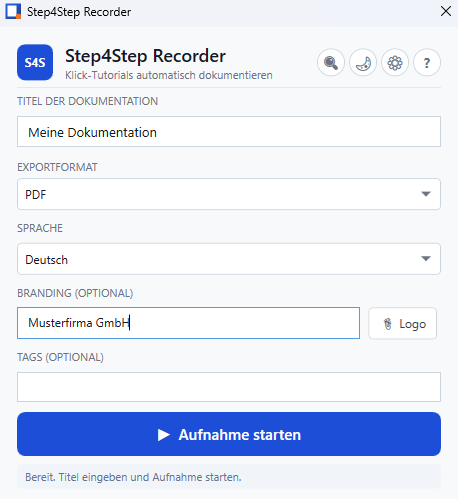
Automatic capture
Clicks, right-clicks, keyboard input, and screenshots are recorded step by step.
Windows · Multilingual · Offline
Step4Step captures clicks, keyboard input, and screenshots and turns them into ready-to-use Word or PDF guides – locally on your PC, no cloud.
Build a knowledge base for you and your team and reduce support workload.
Clicks, right-clicks, keyboard input, and screenshots are recorded step by step.
Raw actions become clear instructions in German, English, French, or Spanish.
Word and PDF export with screenshots – ideal for training, support, and IT documentation.
No cloud, no upload of your screenshots. Privacy by design.
.key file by email.One-time payment
Per Windows user · digital license file · unlimited use of the purchased version
After successful payment you receive the personalized .key file by email. In Step4Step click “Install License …” and restart the app.
After 7 days recording is disabled. Exported trial documents contain a watermark. Installed licenses remain valid.
The license covers the version available at purchase. Major future versions require a new license; existing customers receive a discount on request.
You can set up central network storage and access, search, share, and view guides from all computers.
Copy the guide ID from the program and share it via any channel. Others can open it in the program using the ID.
Export guides as PDF and print them.
No, the purchase is final. Digital licenses are excluded from withdrawal once delivered.
New versions are available for download on the website. Run the installer to replace the old version.
Uninstall Step4Step via Windows Settings or Control Panel.
Yes, if the same Windows user account is used (e.g. home PC and office laptop). Each person needs their own license.